
WordPress Speed Optimization Service
A slow WordPress website loses visitors before they read a word. I find what is slowing your site down, fix it and show you the before and after numbers, so pages load faster on phones and pass Core Web Vitals.
- Fixed quote after a speed review
- Core Web Vitals focused
- Before and after report
- Works with any WordPress site
What WordPress Speed Optimization Includes
Every slow site is slow for its own reasons. I test first, then fix the causes that matter most instead of installing one more plugin and hoping.
Speed Audit
Your key pages tested on mobile and desktop, with a plain-English list of what is slowing them down.
Image Optimization
Images resized, compressed and served in modern formats, with lazy loading where it helps.
Caching and Compression
Page caching, browser caching and compression set up correctly for your hosting.
Fonts and Scripts
Fonts hosted locally and preloaded, and scripts that block the first paint delayed or removed.
Plugin and Database Cleanup
Unused plugins, heavy add-ons and database clutter removed, so the server answers faster.
Layout Shift Fixes
Jumping content fixed, so pages stay stable while they load and pass the Core Web Vitals layout check.
When Your WordPress Site Needs a Speed Fix
Speed affects how many visitors stay, how many get in touch and how Google rates your pages. If any of these sound familiar, a one-time optimization is usually the quickest win.
- Your pages take several seconds to load, especially on phones
- Google Search Console reports failing Core Web Vitals on your URLs
- Your PageSpeed score is low and you are not sure why
- The site slowed down over time as plugins and content were added
- You pay for ads and slow landing pages are wasting clicks
How the Speed Optimization Process Works
Speed Review
Send your website address. I test it and note the main causes of slow loading.
Fixed Quote
You get a clear list of fixes and a fixed price before any work starts.
Backup
A full backup is taken first, so every change can be undone.
Optimize
Fixes are applied one at a time and the site is checked after each change.
Report
You receive before and after results and tips for keeping the site fast.
Speed Optimization Pricing
The price depends on what your site needs, so I review it first and send a fixed quote. You know the full cost before work begins, with no hourly billing.
- Speed review of your key pages
- Full backup before any change
- Mobile and desktop tested
- Before and after report
Proof: This Website
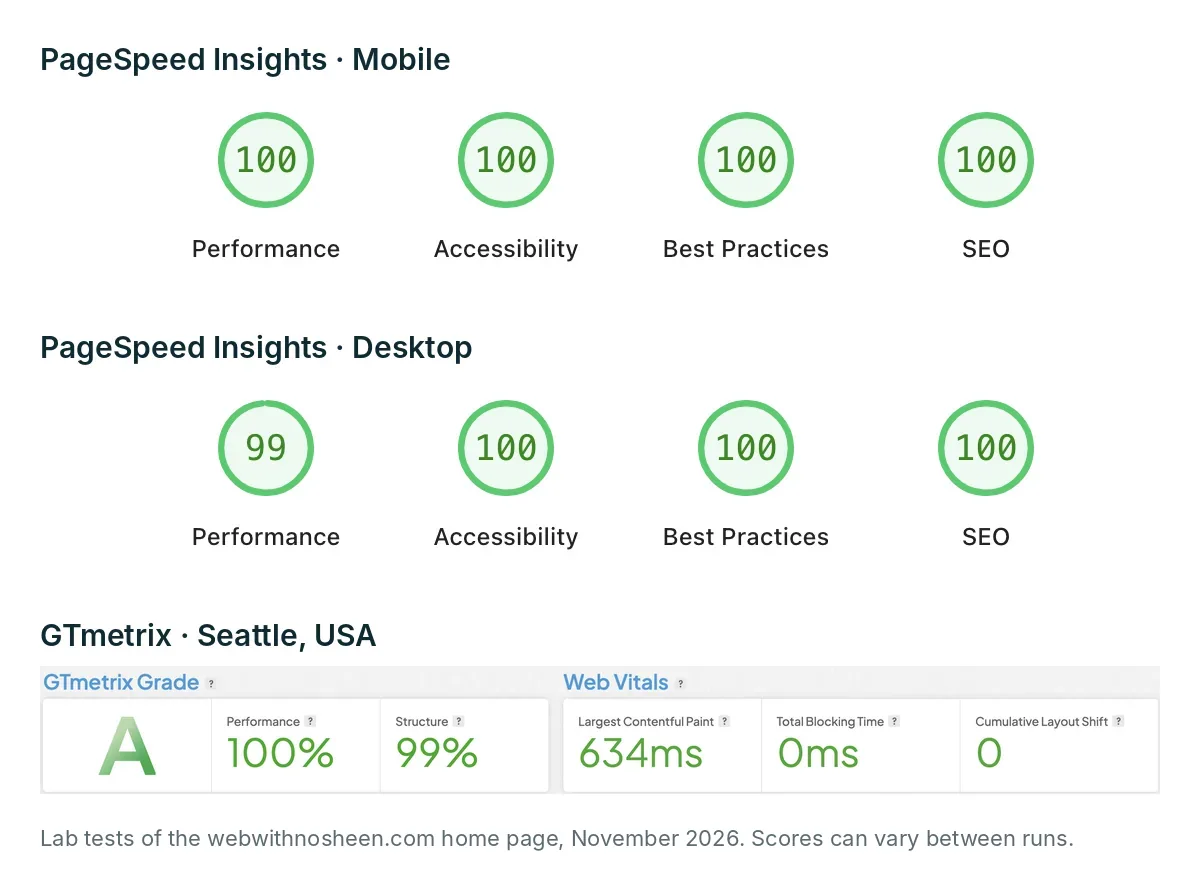
I optimized this website with the same methods I use for clients. These are its home page lab results from Google PageSpeed Insights and GTmetrix, November 2026. Every site is different, so your numbers will depend on your hosting, theme and plugins.
- 100 mobile and 99 desktop Performance score in Google PageSpeed Insights
- Grade A in GTmetrix, with a 0.6 s Largest Contentful Paint
- 0 ms Total Blocking Time and 0 layout shift
- Fonts self-hosted, no third-party scripts
WordPress Speed Optimization Questions
How Much Does WordPress Speed Optimization Cost?
It depends on the size of the site and what is slowing it down. I review your site first and send a fixed quote, so you know the full price before any work starts.
Can You Guarantee a PageSpeed Score of 90 or More?
No honest developer can promise an exact score, because it depends on your hosting, theme, plugins and third-party scripts. After the review I tell you what improvement is realistic for your site, and you see the before and after results.
Will Speed Optimization Break My Website?
I take a full backup before starting and apply changes one at a time, checking the site after each one. If a setting causes a problem, it is rolled back straight away.
Do You Work With Elementor and WooCommerce Sites?
Yes. I optimize WordPress sites built with Elementor, Bricks, Gutenberg or a theme, including WooCommerce stores, where the cart and checkout pages need extra care.
Want your site kept fast every month? See the WordPress maintenance care plan
Ready for a Faster WordPress Website?
Send your website address and I'll reply with what is slowing it down and a fixed quote to fix it.
Request a Speed Review